Event-Driven Processing and Handling Failure
A response saying the work was received isn't the same as the work being done. When the sign-up function only accepts the request and replies 202, an event travels through an EventBridge rule and an SQS queue to the issuing function, and issuing happens afterward. Then idempotency, so work that arrives twice is applied only once, and retrying on failure and isolating what keeps failing in a DLQ, with the reasoning behind each setting, followed by a hands-on that recovers a failed sign-up under its original ID.
- #EventBridge
- #SQS
- #Idempotency
 @Subin Son
A 202 confirms the request was received; the badge comes after
I gave the second talk in Session 03 and led Lab 2. In the approach from the previous talk, a sign-up got its response only after the badge had been fully issued. At McDonald's, that's like a customer standing at the counter until the burger comes out, and when the issuing delay went up to 6 seconds, users waited that much longer too. This time, we changed it so that you hand over a numbered ticket as soon as the order comes in and make the burger afterward.
The wait gets much shorter, but new problems come up: what to do when the same order slip comes in twice, and what to do when making the burger fails. There are four things to take away from this talk.
- Received is not done: 202 confirms the request was received, and issuing continues afterward.
- Events and queues: they hold work and pass it along, absorbing differences in speed.
- Idempotency: even if the same work arrives twice, the result is applied only once.
- Retries and DLQ: if something fails, try again; if it keeps failing, isolate it.
01. Received isn't the same as done
In Lab 1's synchronous approach, the sign-up is saved and accepted, and the response, 201, comes only after issuing has finished too. The user waits for acceptance plus issuing. Lab 2's asynchronous approach responds with 202 right after saving and accepting, and handles issuing after the response, changing the status to ISSUED. The user waits only until the sign-up is accepted.
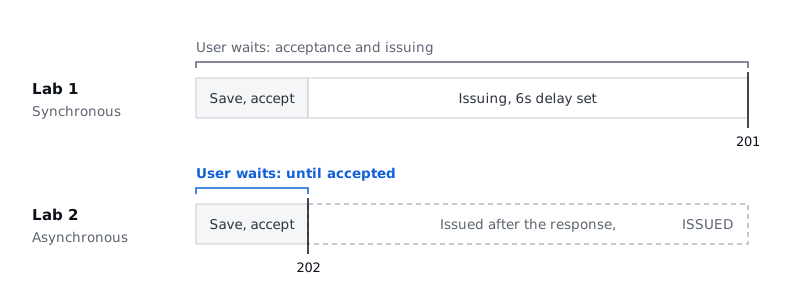
The thing to remember here is that what got faster is the time it takes to get your ticket, not the issuing itself. Issuing still takes the 6 seconds we set. So just remember 202 as the ticket. The 202 Accepted that the sign-up function, register.py, returns means the request was received and will be processed later, not that issuing succeeded. Open 상세 보기 (Details) on the sign-up page and a sign-up that has only been given its ticket is PENDING; check the status again a little later and it has changed to ISSUED.
02. How accepted work gets delivered
Here's how it looks in terms of the functions we deployed with SAM in the hands-on.
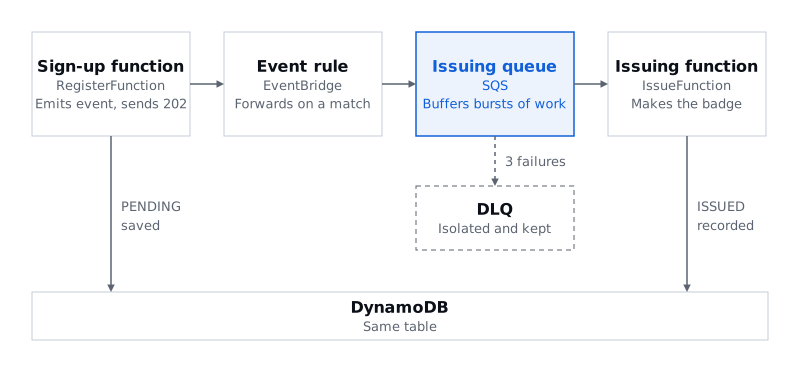
- The sign-up function (RegisterFunction) is the crew member at the counter. When a sign-up comes in, it writes it to the database as
PENDING, publishes one event saying a sign-up came in, and immediately hands over a202ticket. That's exactly where the user's wait ends. - The event rule (EventBridge) sorts the incoming order slips. When an event arrives, it looks at the conditions you set and decides where to send it. In this example, it sends events whose
sourceisevent-signup.registrationand whosedetail-typeisRegistrationReceivedto the issuing queue. - The issuing queue (SQS) is where order slips wait their turn. If sign-ups pour in all at once and the crew can't keep up, errors happen, so the queue holds on to the work and hands it over at a pace the crew can manage. The queue absorbs the difference in speed between the side sending work and the side processing it.
- The issuing function (IssueFunction) is the crew member who actually makes the badges. It takes order slips from the queue, makes the badge, and changes the status in the database to
ISSUED. The sign-up function and the issuing function use the same DynamoDB table. - The DLQ is a queue that sets aside order slips that fail again and again. In this example, it's set up to isolate them after three failures.
By the way, a service that often shows up alongside SQS, almost like a partner, is SNS. It sends notifications to many subscribers at once, like a broadcast, but we didn't use it in this example.
03. The same work twice, one result
The first problem with the ticket approach is duplicates. The property we need here is idempotency. It comes up a lot in computer science courses but is still a pretty unfamiliar word. It means that even if the same order slip comes in twice or more, exactly one result comes out. In this example, duplicates show up in two places.
| Duplicate sign-up | Duplicate work | |
|---|---|---|
| What happens | The same sign-up is sent twice, e.g. by clicking Sign up twice | The same work arrives from the queue again |
| Where it's stopped | register.py | save_badge in issue.py |
| How | Conditional save with attribute_not_exists(registrationId) | Conditional write with attribute_not_exists(badgeCode) |
| Result | Same content: 200 and no new event. Different content: 409 | badgeCode kept, issueCount = 1 |
A duplicate sign-up is like a customer placing the same order twice at the counter. On a website, it's sending a sign-up twice with the same registration ID. Left alone, that could cause errors, so the sign-up function stops it up front. It saves conditionally on the registration ID, so if the same ID already exists, nothing new is saved. If the content is the same too, it returns 200 and shows the existing result without issuing a new badge; if the ID is the same but the content is different, it reports a conflict with 409.
Duplicate work comes not from the customer but from the queue. An order slip has already gone to a crew member, but for some reason the same slip shows up in the queue once more. SQS standard queues are documented as delivering each message at least once. It sounds like wordplay, but it means that once in a while the same message is delivered twice. So when the issuing function writes its result to the database, it adds a condition to write only if there's no badgeCode yet. That way, even if the same slip arrives twice, the badge is issued only once.
04. Retry on failure, isolate if it keeps failing
The second problem is when making the burger goes wrong. When the issuing function first picks up an order slip, the queue hides that slip for a while, because no other crew member should take the same one. This period is called the visibility timeout, and here we set it to 60 seconds. If the issuing function ends with an error, it hasn't marked the work as done, so after 60 seconds the slip reappears in the queue. Then a crew member, the same one or another, picks it up again. That's a retry.
Each time it's picked up, the receive count (receiveCount) goes up: 1, 2, 3. Because the maximum receive count (maxReceiveCount) is set to 3, a slip that fails three times is moved to the DLQ (dead-letter queue) and isolated.
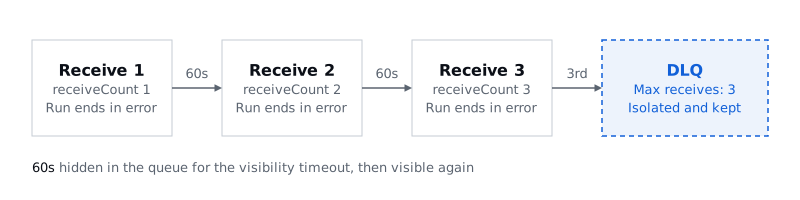
The tricky part when implementing it is that a retry only happens if you report the failure as a failure. Lambda treats a run as failed only if the error is raised again. And since it waits 60 seconds three times, it takes roughly 3 minutes or more before you can check the DLQ, and the exact time isn't guaranteed.
05. The settings and the reasons behind them
| Setting | Value | What it means and why |
|---|---|---|
| Timeout | 10 seconds | The longest a single run of the issuing function can take. It's the time one crew member gets, and if they don't finish within 10 seconds, the function is forcibly stopped |
| Visibility timeout | 60 seconds | How long a slip stays hidden in the queue. It's 6 times the function timeout, and AWS recommends at least 6 times the function's timeout |
| maxReceiveCount | 3 | The count includes the first receive. It's a low value so we could see repeated failures quickly in class; AWS recommends at least 5 |
The reason to make the visibility timeout comfortably longer than the function timeout is that if a slip reappears in the queue while the crew member is still working on it, another crew member will try to process it too. A maximum receive count of 3 is a value we lowered so we could see the DLQ within the lab, so don't carry it straight into production. Decide it by looking at how failures show up and how long recovery takes. The basis for all this is AWS's documentation on configuring an SQS event source for Lambda. In this assignment too, don't just write down the settings; cover why you chose each value and what happens if you change it.
06. The DLQ is where recovery begins, not the end
Because the DLQ is called the problem queue, some people think that once something is isolated, that's the end of it. To me, the DLQ is where you find your biggest clues for recovery. Just piling up slips there doesn't make anything happen, but because the slips that failed again and again collect there, you can find out why they failed.
- Isolate: keep messages that failed repeatedly in the DLQ.
- Fix: find the cause, fix it, and deploy.
- Redrive: send the DLQ's messages back to the issuing queue to process them again.
Be careful: if you redrive without a fix, the same error just repeats. Send them back only after fixing the cause, so the error doesn't happen again.
07. Hands-on: asynchronous processing and failure experiments
We turned the event sign-up service deployed in Lab 1 into an asynchronous setup and watched duplicates and failures happen ourselves. You check the flow in the stack (2-1), see acceptance and issuing split apart (2-2), confirm that sending the same work again still leaves one result (2-3), and then find the cause of a failed sign-up and recover it under its original ID (2-4).
Setup and the Lab 1 deployment carry over from the previous talk's hands-on. Screenshots of each screen and the full set of commands are in chapter 2 of the hands-on guide for your operating system (macOS, Linux, and CloudShell or Windows, in Korean). The commands below are for macOS, Linux, and CloudShell; in Windows PowerShell, use the guide's functions (Deploy-Step2, Show-Logs, Start-Redrive, and so on). The sign-up page is in Korean, so its labels appear below with their meaning in parentheses.
Deploying ahead and sending a failing sign-up
When the talk starts, deploy with the same folder, stack, and region as Lab 1. Set the issuing delay to 6 seconds to compare with the earlier experiment.
make step2 DELAY=6
make url
In PowerShell, it's Deploy-Step2 -Delay 6. The setup reuses the existing table and API in the same stack, so once the deployment finishes, check the Outputs again and choose 실습 2 · 비동기 (Lab 2, asynchronous) on the sign-up page. Use new registration IDs so they don't get mixed up with Lab 1's data.
Once the deployment is ready, first send one sign-up with 오류 실험 (Error experiment) → 신청하기 (Sign up). It's a sign-up with the affiliation left blank, and the response is 202. Write this failing registration ID down separately. It was accepted, but issuing will keep failing, so while it takes a few minutes to reach the DLQ, go on with the next steps, then come back to it in 2-4 and recover it. Don't fix issue.py until then.
2-1. Checking the flow in the stack
In CloudFormation → your stack → Resources, find the row by its Logical ID and click the Physical ID link in the same row to go to that resource's page. The settings from the talk are really there, like this.
| Where | Logical ID | What to check |
|---|---|---|
| EventBridge, your event bus → Rules | RegistrationRule | source = event-signup.registration, detail-type = RegistrationReceived, target is the issuing queue |
| The SQS issuing queue → Settings, Dead-letter queue | IssueQueue | Visibility timeout 60 seconds, maxReceiveCount 3, the attached DLQ |
Lambda IssueFunction → Configuration → Triggers | IssueFunction | SQS trigger, 1 message at a time |
Lambda IssueFunction → Configuration | IssueFunction | Timeout 10 seconds, ISSUE_DELAY_SECONDS = 6, IDEMPOTENT = true |
2-2. Acceptance and issuing, split apart
Send a new sign-up with 정상 신청 (Normal sign-up) → 신청하기 (Sign up) and note its ID. The response is 202 with PENDING, and it comes right away without waiting for the 6 seconds of issuing. The actual response time can be affected by cold starts and the network. Watch for ISSUED and the badge to show up a little later, and if automatic checking has stopped or the result is slow, click 상태 조회 (Check status). In the activity log in the guide's screenshot, the 202 came back in 0.5 seconds, the database showed PENDING at 2.3 seconds, and ISSUED at 7.0 seconds.
Look at the logs of both functions together. Put the register and issue log groups side by side and search by registration ID, and you'll see the sign-up function's registration_saved and event_published followed by the issuing function's issue_started and badge_saved. In the terminal, make logs F=IssueFunction shows the issuing function's logs live, but those times are in UTC, nine hours behind Korea time. Don't conclude the processing order from the order the logs arrived in alone.
The page's HTTP 응답 (HTTP response) and 응답 시간 (Response time) show the result of the most recent sign-up or resend request, so they're overwritten when you send the next one. Take the screenshots you need for the assignment before resending. If the first response is 202 and the later database result is ISSUED with issueCount = 1, acceptance and issuing have been split.
2-3. Sending the same work again
Once the normal sign-up is ISSUED, note its badgeCode and issueCount and click 작업 재전송 (Resend job). This button sends a new event for the saved sign-up, recreating the situation where the same work comes back into the issuing queue. Check the status a little later and the badge code is unchanged, with issueCount still at 1. The issuing function's logs show badge_already_issued_skip, meaning it skipped work that had already been issued, and you can find that condition in save_badge in step2/src/issue.py. The event came again, but the issuing result in the database was applied only once, and that's the extent of the idempotency this example guarantees.
If you have time left, try the optional experiments too.
| Option | How | Result |
|---|---|---|
| Duplicate sign-up | Click 신청하기 (Sign up) again with the same content and the same ID | Stopped at acceptance with 200, no new event |
| Conflict | Send the same ID with a different name, email, or affiliation | 409, and the original sign-up stays unchanged |
| Idempotency off | Change the issuing function's IDEMPOTENT to false, then compare a new sign-up with a resent job | The issue count can go up. Always set it back to true when you're done |
2-4. Finding the cause of the failure and recovering
These six steps recover the failing sign-up you sent at the start, under its original ID. You do ①–③ yourself; ④–⑥ were shown in a presenter demo, and you continue them on your own as recommended items in the assignment.
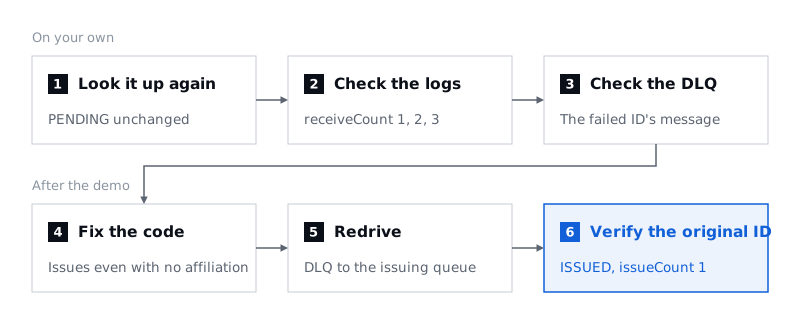
- Look it up again: Enter the failing ID you wrote down in the registration ID field and click
상태 조회(Check status); it's stillPENDING. Checking the status alone doesn't tell you why it failed. - Logs: Find the failing ID in the issuing function's logs, and you'll see the
receiveCountinissue_startedclimb 1, 2, 3, with anissue_failedentry each time recording the error type (errorType) and message (error). Find the file and line in the error's traceback too. On the sign-up page, affiliation is an optional field, but the issuing function assumes it's always there. Compare the optional fields in the input with the data the issuing code expects. - DLQ: In SQS → that DLQ → Send and receive messages → Poll for messages, check the registration ID in the message body. Only the message that failed repeatedly is isolated, and meanwhile the other normal sign-ups are processed through to
ISSUED. Don't delete the message. Polling the original issuing queue directly in the console affects the receive count and processing, so watch the issuing queue through the logs instead. In the terminal,make dlqshows how many messages are in the DLQ andmake dlq-peekshows their contents, butmake dlq-peekalso raises the receive count, so don't run it over and over. - Fix the code: Keep affiliation optional, and fix
step2/src/issue.pyso the badge is issued properly even when it's empty. Test locally, then deploy again. Before the fix,make test-exerciseis expected to fail; after the fix, both tests should pass. - Reprocess: Send the DLQ's message back to this stack's issuing queue and watch the progress. In the console, go to the DLQ → Start DLQ redrive and set this stack's
IssueQueueas the destination queue. - Verify: Without signing up again, click
상태 조회(Check status) with the original failing ID and confirmISSUEDandissueCount = 1. A queue's message counts are approximate, so check the database result and the logs as well.
These are the commands for ④ and ⑤. In PowerShell, run the tests with py -m unittest -b tests.test_handlers -v and py -m unittest -b tests.test_exercise -v, and deploy and reprocess with Deploy-Step2 -Delay 6, Start-Redrive, and Show-Redrive.
make test
make test-exercise
make step2 DELAY=6
make redrive
make redrive-status
If you're continuing ④–⑥ as part of the assignment, leave the stack in place. The failing ID and the DLQ message live in that stack.
What to record for the assignment
The four things you checked in the hands-on carry straight over to the assignment's completion criteria, C1–C4. Capture the evidence from your own stack, not from the demo screen.
| Criterion | Guide | Evidence to keep |
|---|---|---|
| C1 Request flow | 2-1, 2-2 | The 5 services in Resources, the same registration ID in both logs, ISSUED and badgeCode |
| C2 Separating acceptance from processing | 2-2 | 202, a response time far shorter than 6 seconds, the status changing from PENDING to ISSUED |
| C3 Preventing duplicate results | 2-3 | badgeCode and issueCount = 1 unchanged after a resend, badge_already_issued_skip in the logs |
| C4 Isolating failures | 2-4 ①–③ | The error logs, the rising receiveCount, the failing ID arriving in the DLQ, normal sign-ups that became ISSUED in the meantime |
The assignment is optional, and the deadline is 2026-11-17 21:00 (KST). Include your architecture diagram and each service's role; settings such as the 10-second timeout, the 60-second visibility timeout, and the maximum receive count of 3, along with why you chose them; the input and the expected result for each of the normal, duplicate, and failure cases; and the actual results. Once you've confirmed the recovery, run make delete with the same stack name and region, and clean up the practice IAM user's access key and its AdministratorAccess too.
Handing out the ticket first gets users an answer quickly, but behind it you have to design for work that arrives twice or fails. The idempotency, retries, and DLQ we looked at today are where that design starts.
Files